ICST MultiDecoder
Level: Advanced | Audience: Technician, advanced composer, studio operator, researcher.
Use this page when a single decoder is no longer enough for your loudspeaker setup and you need separate decoding strategies for different speaker subsets or layers.
When to use MultiDecoder
Use ICST MultiDecoder when:
- your loudspeaker array has clearly different height layers
- different loudspeaker subsets need different order, weighting, or filter settings
- you want to compare decoding strategies inside one plugin
- you want to keep one shared B-format input but distribute it differently across multiple zones
When a normal decoder is enough
The standard ICST Decoder is usually enough when:
- the array is symmetric and single-layered
- one decoding strategy should apply to the whole speaker set
- you do not need per-layer filtering or segmentation
Do not use MultiDecoder just because it is available. It adds flexibility, but also adds setup complexity.
What MultiDecoder does
The ICST MultiDecoder extends the normal decoder by running up to four parallel decoder units inside one plugin. All units receive the same B-format input, but each unit can address its own loudspeaker subset and use its own settings.
This makes it possible to treat:
TopMidBottom- or other custom subsets
as distinct playback layers without leaving the B-format workflow.
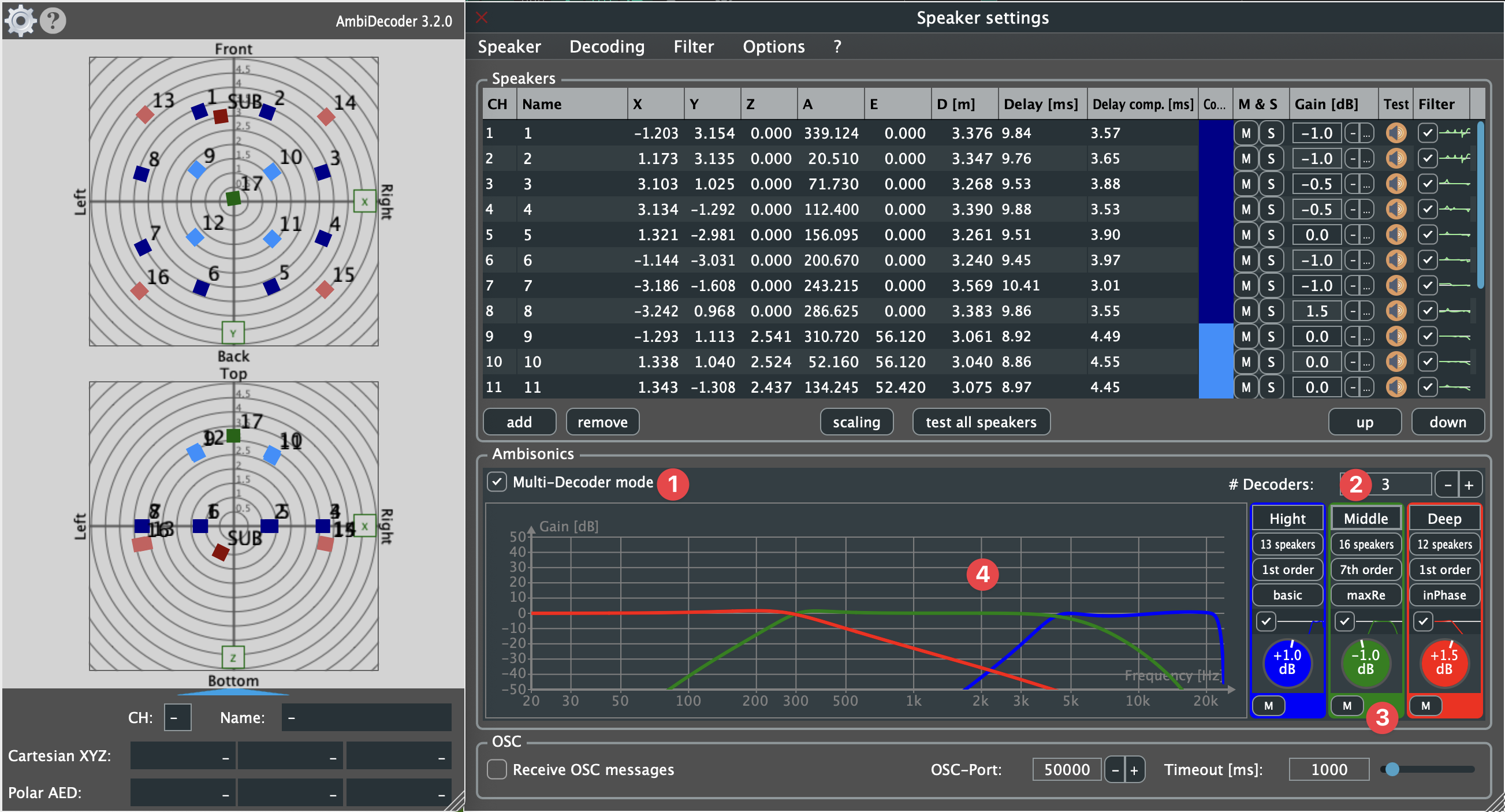
The main controls at a glance:
| # | Control | Function |
|---|---|---|
| 1 | Multi-Decoder toggle | Activates / deactivates multi-decoder mode |
| 2 | Add Decoder | Adds a new decoder unit (up to 4) |
| 3 | Volume & Mute | Per-unit level and mute |
| 4 | Filter Bands | Opens the filter section for that decoder unit |
Basic setup
Start with this minimal logic:
- Route one stable Bformat Master into the decoder.
- Activate MultiDecoder mode.
- Add only the units you really need.
- Assign a clear loudspeaker subset to each unit.
- Name the units by function, for example
Mid Ring,Top,Sub. - Verify speaker order and level for each unit before changing weighting or EQ.
The practical rule is: first make the routing work, then refine the decoding.
Decoder logic in three steps
MultiDecoder does not replace the basic decoder logic. It extends it across several loudspeaker zones:
- Geometry
Define each loudspeaker subset clearly and verify where each unit projects. - Timing
Make sure scaling, distances, and delay relationships are stable before comparing layers. - Voicing
Only then compare order, weighting, gain, and filtering to hear how the layers differ perceptually.
In practice: do not start with voicing experiments while geometry or timing are still uncertain.
Decoder series:
Typical layer strategies
Typical use cases:
- Top / Mid / Bottom layer separation
- frequency-dependent treatment across layers
- separate decoding for special loudspeaker zones
- A/B comparison of decoding strategies inside one session
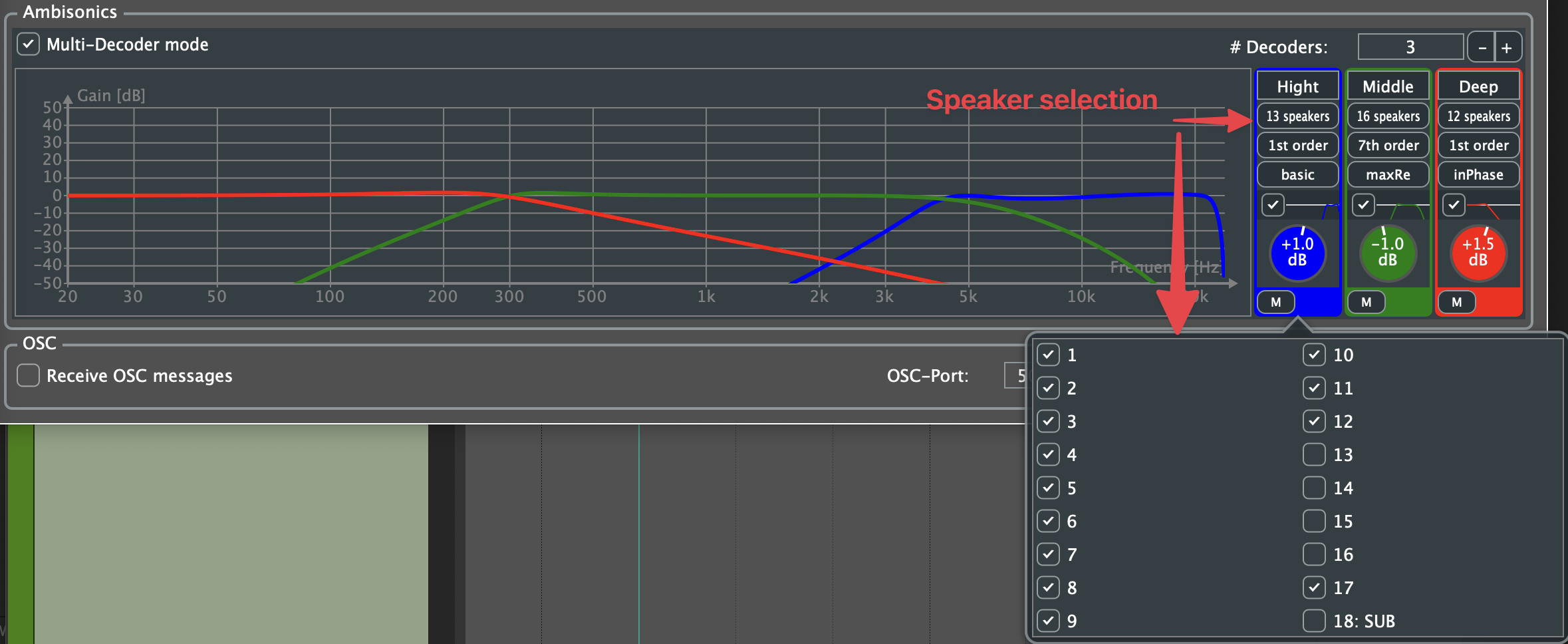
Psychoacoustic rationale
The MultiDecoder does not implement Blauert bands directly. What it offers is a practical way to tune different loudspeaker layers differently while keeping one shared B-format input.
This can make sense because different perceptual tasks are not equally sensitive to the same cues:
- Elevation often depends strongly on spectral detail, especially in the upper frequency range
- the main horizontal image usually benefits from the most stable and neutral decoding
- low-frequency support often contributes more to weight and envelopment than to clear vertical localisation
That is why layer-based tuning can be useful in vertically extended arrays. A Top layer may benefit from a different order, weighting, or gentle filtering than the main ring, while a Bottom or Sub layer may serve a different perceptual role again.
Important: a loudspeaker layer is not automatically a perceptual depth layer. Height, width, envelopment, and distance are related but not identical phenomena.
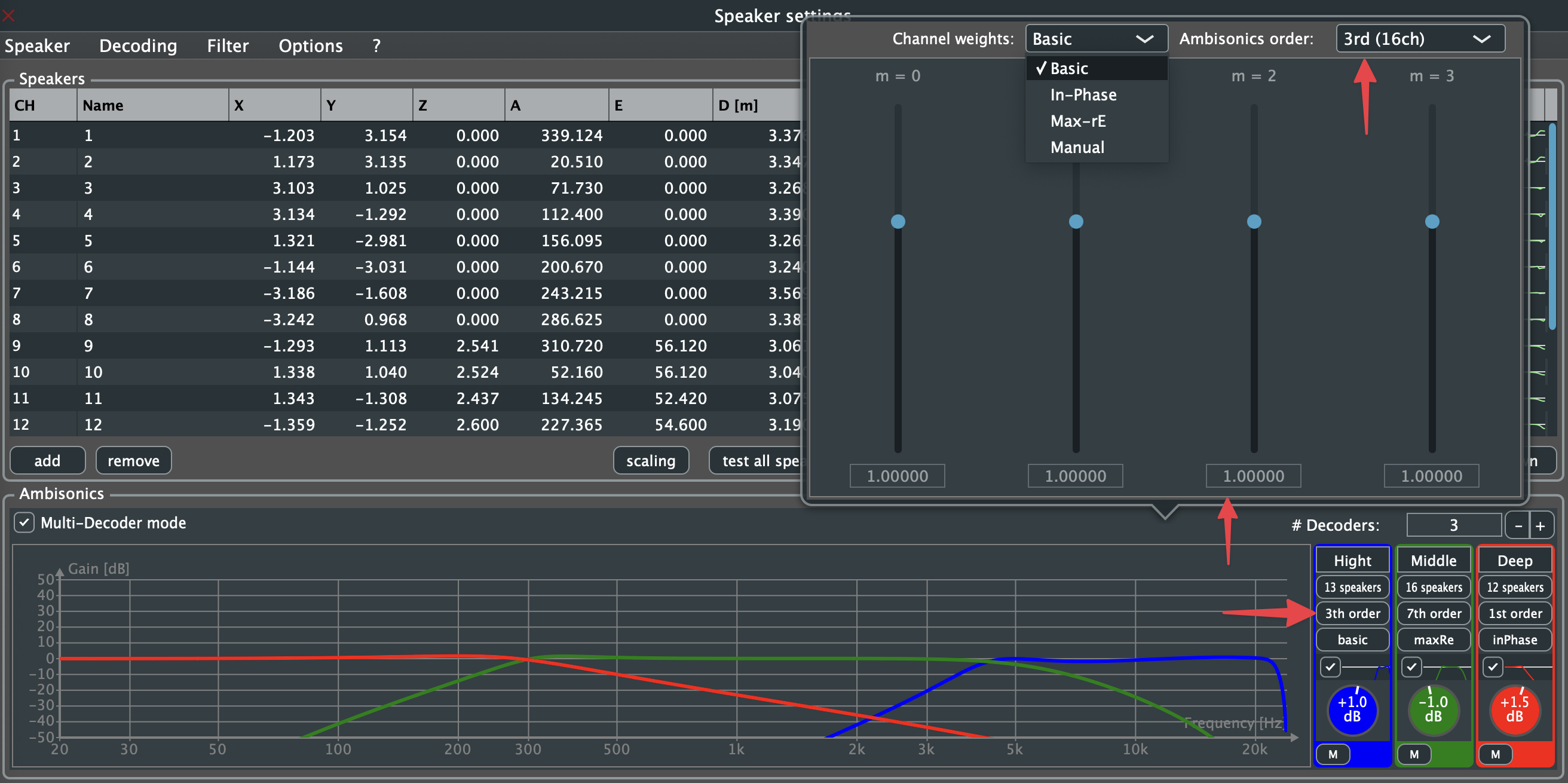
Ambisonics order and weighting
Each decoder unit can use its own Ambisonics order and weighting.
- lower orders tend to sound wider and softer
- higher orders give sharper localization
- weighting changes the trade-off between focus and energy distribution
Per-layer filtering
Each unit also has its own filter section, which is useful when one layer should be treated differently from another, for example ceiling speakers versus the main ring.
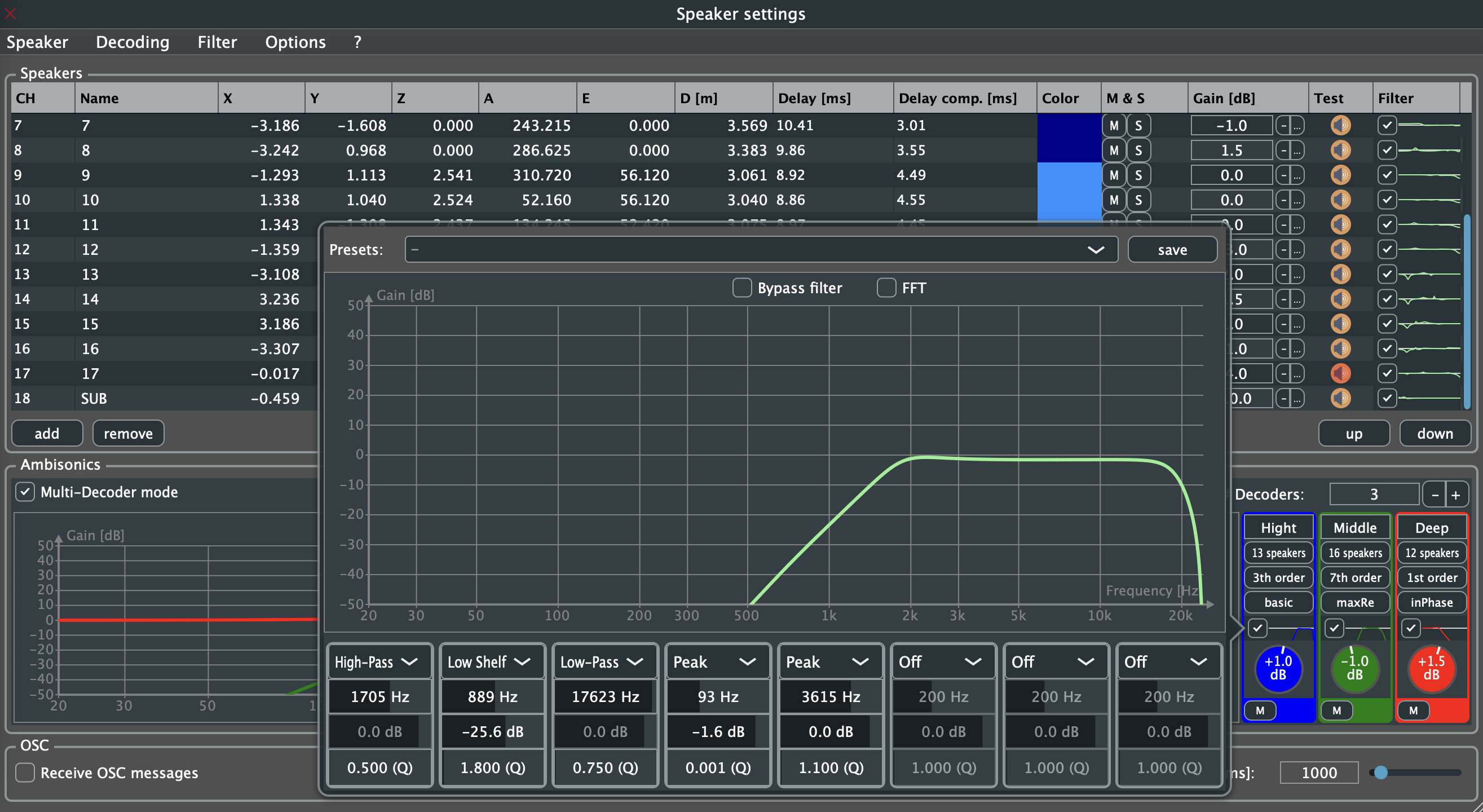
Use filtering conservatively. The goal is usually not to split the sound field into artificial frequency bands, but to make small corrections that improve clarity, stability, or translation on a specific array.
Per-unit audio parameters

Per unit you can control:
- Filter on / off
- Individual gain
- Mute / unmute
Typical perceptual roles of layers
| Layer | Typical goal | Typical treatment |
|---|---|---|
| Top | clearer elevation cues | careful comparison of order/weighting, possibly gentle HF support |
| Mid | stable main image | most neutral decoding, often the main reference layer |
| Bottom / Sub | weight, support, envelopment | restrained LF-focused treatment, not a “distance decoder” by itself |
Why it matters
Standard Ambisonics decoding applies one strategy to the whole loudspeaker set. In vertically extended arrays, this can produce a blurred height image because upper and middle layers are treated too uniformly.
By separating the array into decoder units, you can experiment with per-layer psychoacoustic tuning while keeping the field-based Ambisonics structure intact. The main advantage is not that MultiDecoder “knows perception” by itself, but that it gives you a controlled way to compare different settings for different loudspeaker zones.
That is why MultiDecoder is especially useful in:
- complex studio arrays
- vertically extended concert systems
- research setups with comparison needs
Common mistakes
- creating overlapping speaker subsets without intending to
- changing order, weighting, EQ, and gain all at once before basic routing is verified
- using MultiDecoder where a normal decoder would be simpler and clearer
- naming units too vaguely, so later troubleshooting becomes difficult
- skipping speaker-order verification after assigning a new subset