ICST Ambisonics Workshop: Working With Ambisonics
Working with Ambisonics
Online-Workshop · ICST / ZHdK · ambisonics.ch
Learning Objectives
After this workshop you will be able to:
- explain the Ambisonics signal flow from recording to playback
- distinguish A-format (PCM audio) from B-format (mathematical format)
- set up and route a Zylia ZM-1 HOA recording in Reaper
- position sound sources in three-dimensional space using the ICST AmbiEncoder_64
- convert FOA/HOA material between FuMa and AmbiX formats
- carry out a guided hands-on exercise (Encoding → Mixing → Decoding) independently
- integrate external tools (MaxMSP, Csound/Cabbage) into an Ambisonics workflow
Contents
Overall Workflow
Ambisonics is a channel-format-independent, full-sphere audio system. Every production follows the same chain — regardless of whether the target is headphones, an 8-channel ring, or a 24-channel dome.
The Ambisonics Signal Flow
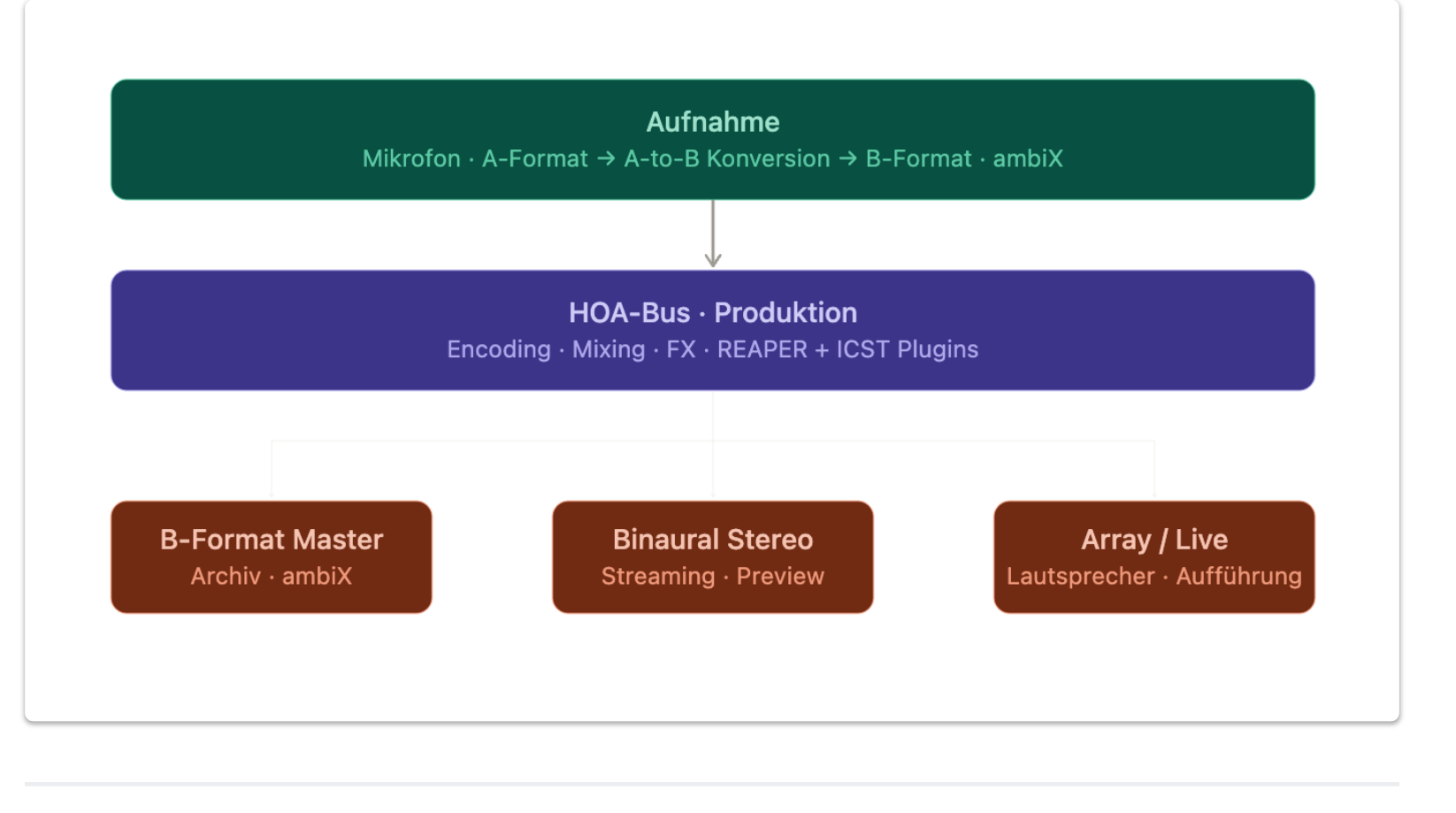
| Step | What happens | Tool (Workshop) |
|---|---|---|
| 1. Recording | Microphone array → A-format (raw capsules) or direct HOA | Zylia ZM-1 → Zylia App |
| 2. A-to-B Conversion | Raw capsule data → B-format (AmbiX / HOA) | Zylia App, JS plugin |
| 3. Encoding | Position mono/stereo sources in space | ICST AmbiEncoder_64 |
| 4. Processing | EQ, reverb, panning on the HOA bus | Reaper FX chain |
| 5. Decoding | B-format → playback format | ICST AmbiDecoder |
| 6. Delivery | Render master, choose format | Reaper Render |
The golden rule: Render the B-format master track — never the decoder output. The decoder is for monitoring only. One and the same B-format master works for headphones, loudspeakers, and streaming.
→ Workflow from Recording to Delivery — in-depth step-by-step guide
→ Getting Started: ICST Plugins in Reaper — introduction to the plugin chain
Monitoring Setup
Before recording starts, monitoring must be in place:
- Binaural (headphones): Load ICST AmbiDecoder with HRTF preset → direct spatial feedback without loudspeakers
- Check decoder preset: Does the layout (channel count, speaker geometry) match the actual setup?
- Never run binaural and loudspeakers in parallel: Only one decoder active — otherwise phase errors in the mix
- Separate monitoring branch: Binaural monitor track on a dedicated bus, not looped into the B-format master
Formats & Normalisation
| Format | Channel order | Normalisation | Status |
|---|---|---|---|
| FuMa (Furse-Malham) | W, X, Y, Z | MaxN | Older, legacy |
| AmbiX (ACN / SN3D) | W, Y, Z, X | SN3D | Current standard |
Rule of thumb: Always work and archive in AmbiX (ACN/SN3D). Use FuMa only for compatibility with legacy material.
| HOA Order | Channels | Microphone example | Spatial resolution |
|---|---|---|---|
| 1st Order (FOA) | 4 | Zoom H3-VR, Sennheiser Ambeo | Good as stereo replacement, coarse directionality |
| 2nd Order | 9 | — | Significantly sharper localisation |
| 3rd Order | 16 | Zylia ZM-1 | High resolution, production reference |
→ Which Ambisonics Order Do I Need? — practical decision guide
Delivery Formats
| Target | Format | Note |
|---|---|---|
| Archive / Master | Multichannel WAV, AmbiX, 48 kHz / 32-bit float | Unaltered B-format master |
| Binaural | 2-channel WAV | Streaming, preview, headphones |
| Loudspeakers | N-channel WAV | Performance, installation |
| YouTube 360 | Binaural + Spatial Metadata | Spatial Media Metadata Tool |
→ Exporting the B-Format Master — Reaper settings for archive and delivery
How to Record Ambisonics — Zylia ZM-1
Recording 3D Audio: The Recording Workflow
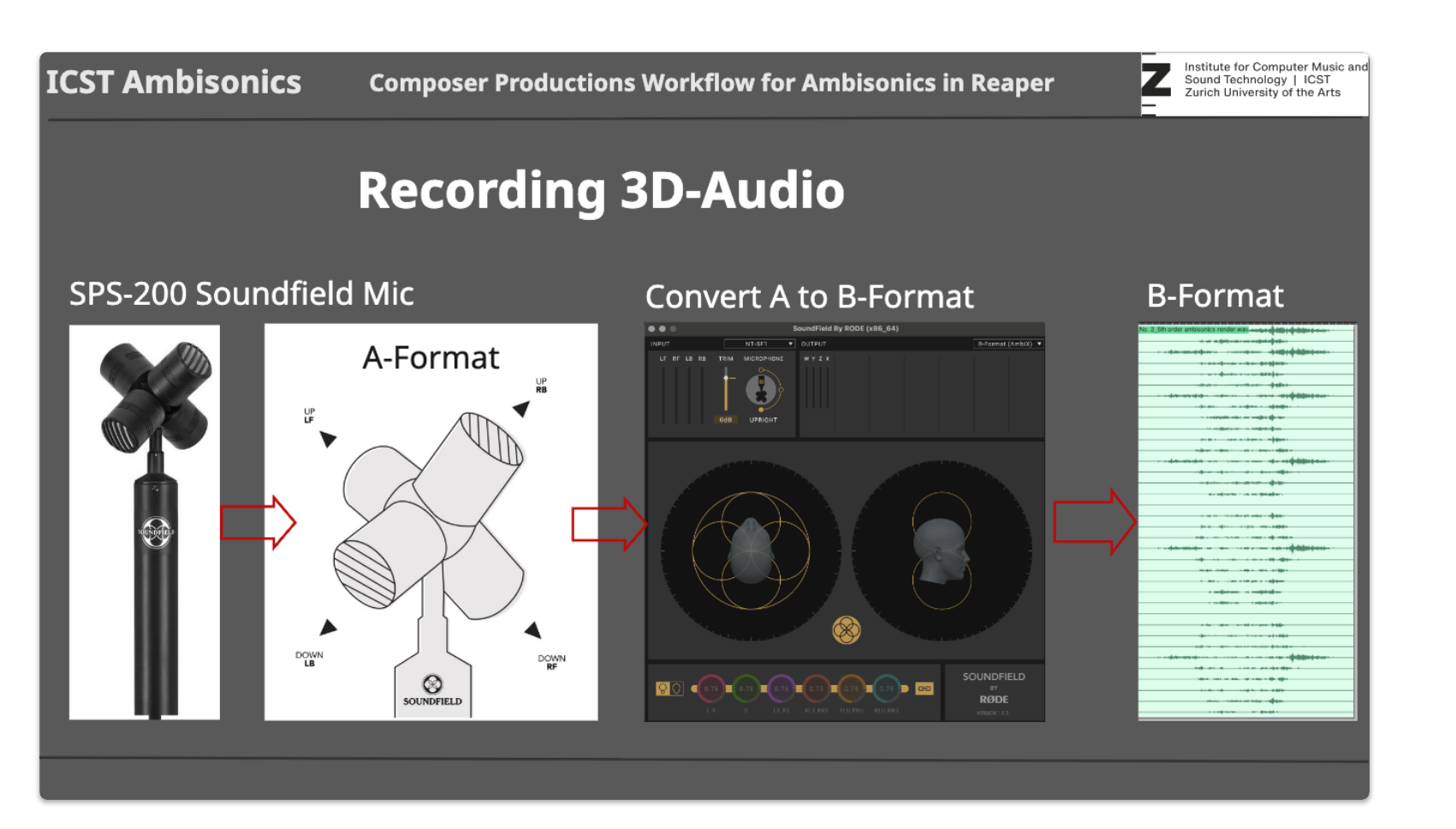
Workflow (Hands-on with Zylia → Main Reaper)
- Short Recording Session — Set up Zylia ZM-1, check levels (−18 dBFS), record 30–60 seconds → 19-channel A-format PCM
- A to B Converting — Zylia App: import A-format, export as 3rd Order HOA → 16-channel B-format AmbiX WAV
A-format = PCM audio (regular audio data, raw capsules)
B-format = Mathematical format (spherical harmonics, not directly listenable) - Listening B-Format — Load in Reaper, listen binaurally via HOA bus + AmbiDecoder: does "front" actually sound in front?
- Upsampling & FX — EQ, reverb on HOA bus, distance automation on the encoder
- Mastering B-Format — Render HOA Render Bus: 16 ch, 48 kHz, 32-bit float WAV → B-format master
Microphone Specifications
- 19-capsule array (omnidirectional)
- Output: 19 raw channels → encoded to 3rd Order HOA (16 channels, AmbiX) by the Zylia software
- Connection: USB-C, no external power required
Microphone Placement
The position of the microphone determines the listening perspective — this is not a technical but a compositional decision.
- Height: approx. 1.5 m for a natural ear-level perspective; lower for a “ground level” effect, higher for an overview perspective
- Orientation: The microphone has a preferred direction (marker). “Front” in B-format corresponds to this direction — document it so that decoding is correct
- Distance to source: Closer = more direct sound, more spatial detail; further = more diffuse field, less localisation
- Reflections: Hard walls, floors, and ceilings are very prominent in an HOA microphone — listen carefully to the placement location before recording
- Wind protection: Always use a windshield outdoors (blimp or fur). Activate LF roll-off below 80 Hz
Gain Management
- Target level: approx. −18 dBFS (check all 19 channels individually)
- Headroom: at least 12 dB — transients in HOA microphones can peak unexpectedly
- Monitor all raw channels separately: a single clipping channel corrupts the entire B-format
- Set the gain structure in the Zylia app, not in Reaper after the fact
A-to-B Conversion
The Zylia ZM-1 delivers A-format (19 raw channels). The Zylia software converts these to 3rd Order HOA (16 channels, AmbiX):
- When to convert? Immediately after recording, before importing into Reaper
- Quality control: Test phase and channel assignment — a mono test source from the front should sound clearly in front in the binaural monitor
- Archive raw data: Always keep the A-format (19 channels) — this allows re-conversion later with better software
Field Recording Checklist
Before recording:
- Acoustic survey: reflections, noise sources, wind direction
- Decide on microphone placement and document it (height, orientation, distance)
- Level check: all 19 channels at approx. −18 dBFS
- Binaural monitoring active and verified
- Metadata template prepared (location, date, take number, weather)
After recording:
- A-to-B conversion in Zylia app
- Load HOA file (16 ch AmbiX) in Reaper and verify binaurally
- Archive raw channels (A-format)
Reaper Session (pre-configured)
| Track | Channels | Function |
|---|---|---|
| Notes | — | Notes track (muted) |
| Zylia ZM-1 | 16 | Armed for recording · VU: multichannel peaks |
| HOA Bus | 16 | AUXRECV from Zylia · no direct out |
| ICST AmbiDecoder | 18 | 16 ch in + 2 aux · decoder plugin |
| Binaural Monitor | 2 | Headphone monitoring |
| HOA Render Bus | 16 | Muted · for offline render |
→ zylia_recording_example.RPP
Common Recording Errors and Solutions
| Problem | Cause | Solution |
|---|---|---|
| Sound seems “back to front” | Microphone orientation not documented | Test and note front/back on location |
| Comb filtering / unstable direction | Faulty A-to-B conversion | Check for spectral artefacts, repeat conversion |
| Clipping on individual channels | Overloading of individual capsules | Monitor all 19 raw channels separately, reduce gain |
| Wind noise in low frequencies | Missing wind protection | LF roll-off below 80 Hz, use blimp |
| No elevation | FOA loaded instead of HOA | Check channel count: FOA = 4 ch, HOA 3rd = 16 ch |
| B-format import in Reaper incorrect | Wrong ordering (FuMa instead of AmbiX) | Use FuMa → AmbiX converter (JSFX, Block C) |
Composers Workflow — The Three Stages
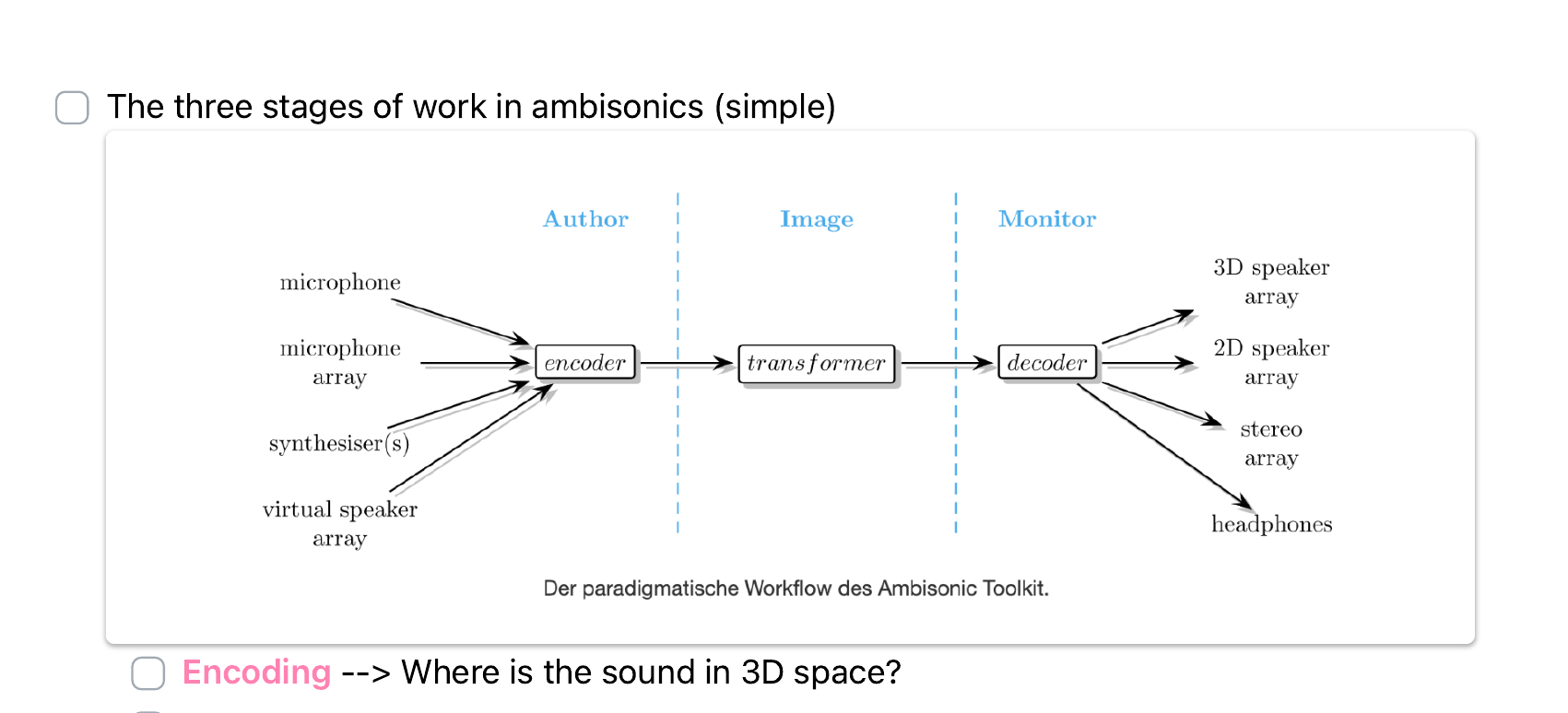
Every Ambisonics production — whether field recording, synthesiser, or live performance — passes through three stages:
| Stage | Question | In practice |
|---|---|---|
| Encoding | Where is the sound in 3D space? | Azimuth, elevation, distance — via ICST AmbiEncoder_64 or Lua script |
| Processing | How does the sound move and how does it interact with the space? | Rotation, movement automation, reverb on HOA bus, distance simulation |
| Decoding | How do I play this back on my audio system? | ICST AmbiDecoder: binaural (HRTF), loudspeaker ring, MultiDecoder |
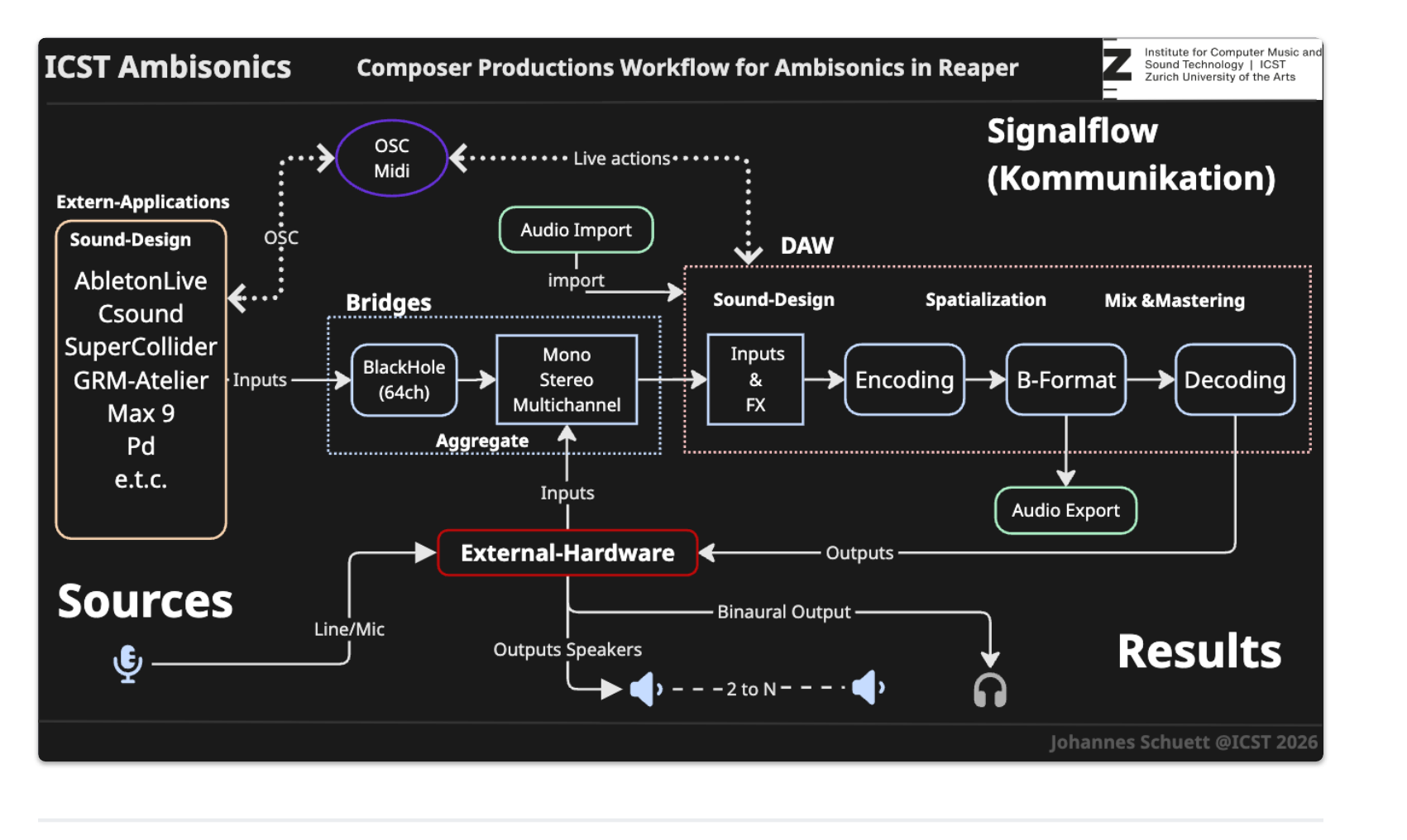
Reaper Workflow: Encoding · Processing · Decoding
Encoding with ICST AmbiEncoder_64
Plugin: ICST AmbiEncoder_64 (VST3) — pre-installed on all workshop computers.
| Parameter | Index | Normalised | Meaning |
|---|---|---|---|
| Azimuth | 11 | 0–1 → −180° to +180° | Horizontal position |
| Elevation | 12 | 0–1 → −90° to +90° (0.5 = horizon) | Vertical position |
| Distance | 13 | 0 = near · 1 = far | Depth |
→ ICST AmbiEncoder – Spiral Walk Script — example of complex Lua automation
→ ICST AmbiEncoder – OSC Syntax — control the encoder via OSC (Touchdesigner, Max, etc.)
Automation: Moving Sound Sources
Physik-basierte Trajektorie: atan2 für Azimut, √(x²+y²) für Distanz.
→ icst_ambi_zug_schnell.lua — express train, 4 seconds
→ icst_ambi_zug_vergleich.lua — pause + slow + pause + fast in sequence
Processing
Distance
In the ICST AmbiEncoder, Param 13 (Distance) simulates depth in space. The plugin attenuates level and high-frequency content with increasing distance — similar to air absorption in real space:
- Near sources (distance ~0): present, direct, high HF content
- Distant sources (distance ~1): quieter, duller, more diffuse-field content
- Combined with reverb: The greater the distance, the higher the wet amount in the room plugin on the HOA bus
Room / Reverb
The reverb sits on the HOA bus track — not on the source track. Only then does the reverb remain anchored in Ambisonics space and get decoded correctly with the B-format.
- ReaVerb or FX reverb on the HOA bus (after all encoders, before the decoder)
- Dry/wet ratio: start sparingly (~10–20% wet), as HOA reverb sounds very prominent
- Room size and pre-delay determine the size of the space
- Separate reverb sends per source allow different room distances
Example: Helicopter Flyover
| Phase | Azimuth | Elevation | Distance |
|---|---|---|---|
| Approach (front) | ~0° | 15° → 70° | 1.0 → 0.3 |
| Overhead | 0° → 180° | 70° → 85° → 70° | 0.3 → min → 0.3 |
| Departure (rear) | ~180° | 70° → 15° | 0.3 → 1.0 |
The script calculates position, azimuth, and elevation directly from 3D coordinates (atan2, Pythagoras) — no manual angle estimation.
Decoding
- Binaural: ICST AmbiDecoder with HRTF file → 2-channel headphones
- Loudspeakers: Decoder with
.spkconfiguration file - Screensets:
Ctrl+Alt+1(Recording) ·Ctrl+Alt+2(Mixing) ·Ctrl+Alt+3(Decoding)
→ Binaural Rendering and Headphone Delivery — binaural render for streaming and headphones
FuMa → AmbiX Conversion (FOA)
For legacy material in FuMa format (e.g. SoundField, older productions):
| FuMa Input | AmbiX Output (ACN) | Gain correction |
|---|---|---|
| Ch1 = W | ACN 0 = W | × √2 = +3.01 dB |
| Ch2 = X | ACN 3 = X | × 1/√3 = −4.77 dB |
| Ch3 = Y | ACN 1 = Y | × 1/√3 = −4.77 dB |
| Ch4 = Z | ACN 2 = Z | × 1/√3 = −4.77 dB |
→ icst_fuma_to_ambix_foa.lua — Lua installer
In Reaper: Actions → Load new Script →
icst_fuma_to_ambix_foa.luaExternal to Reaper
Reaper is not the only environment for Ambisonics. These tools are used by composers and researchers — each with a different approach and different strengths.
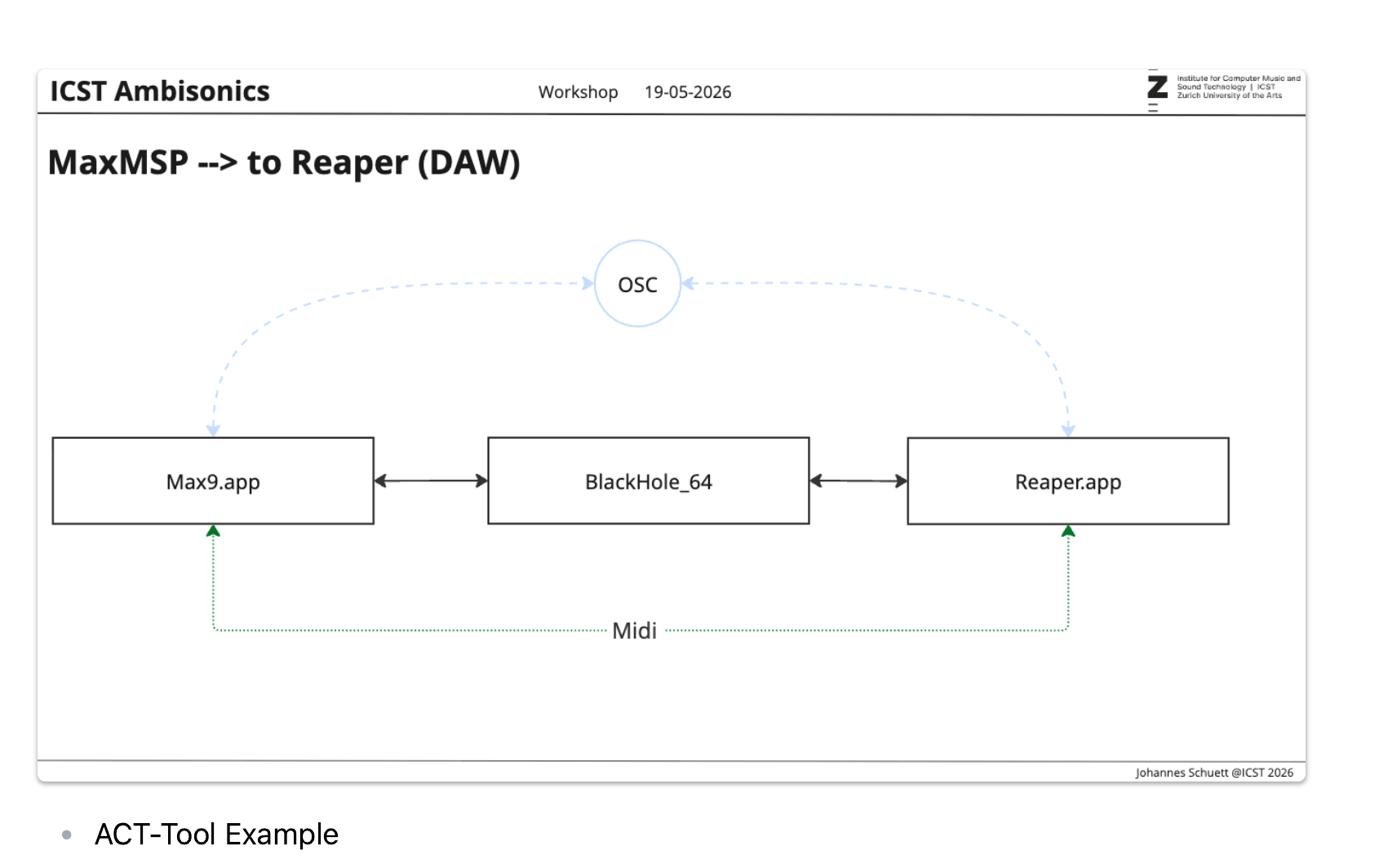
Workflow with MaxMSP: ICST Ambisonics Externals (ambicontrol, ambiencode, ambidecode). Real-time spatialisation, OSC control of the ICST AmbiEncoder in Reaper. Strength: generative and algorithmic spatialisation, live electronics.
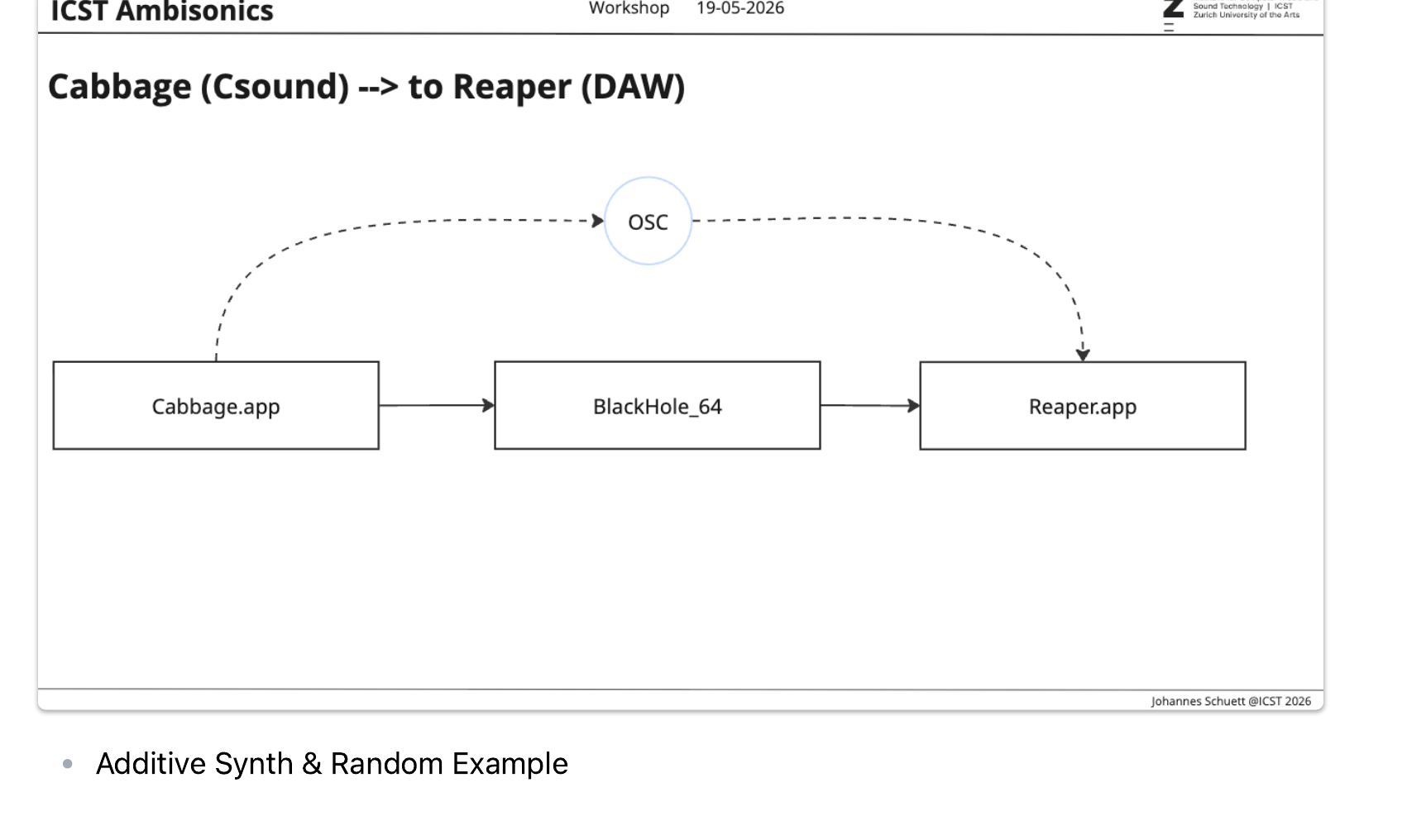
Workflow with Csound (Cabbage.app): Csound opcodes bformenc1 / bformdec2. Cabbage wraps Csound as a VST3 plugin. Strength: precise mathematical control of the sound field, additive synthesis, granular synthesis.
Workflow with Max for Live: MaxMSP integrated in Ableton Live. Combines Ableton’s production workflow with Ambisonics spatialisation. Strength: live performance with Ambisonics, studio production.
Csound / Cabbage
Csound is a programmable audio synthesis language. Cabbage wraps Csound instruments as VST3 plugins and makes them usable in Reaper.
Cabbage → Reaper (DAW)
Key Csound opcodes for Ambisonics:
bformenc1— encodes a mono signal into B-format (1st–3rd order). Input: audio, azimuth, elevation. Output: HOA channels.bformdec2— decodes B-format to a loudspeaker array.
Example: Additive Synth & Random Spatialisation (Cabbage)
A Cabbage example demonstrates: an additive synthesiser generates partials (sine waves) in real time. Each partial is independently spatialised with bformenc1 and a randomised azimuth/elevation. The position drifts randomly — the result is a moving cloud of sound in 3D space, then decoded binaurally.
MaxMSP — ICST Ambisonics Externals
MaxMSP with the ICST Ambisonics Externals provides a complete real-time Ambisonics environment. Unlike a DAW, Max allows algorithmic and generative control of spatialisation — positions can be driven by data, gestures, sensors, or other audio signals.
MaxMSP → Reaper (DAW)
ICST Ambisonics Externals:
ambiencode~— encodes mono audio into B-format. Message input for azimuth, elevation, distance.ambidecode~— decodes B-format to loudspeakers or binaural.ambicontrol— GUI panel for manual spatialisation control.
ACT-Tool Example:
The ACT-Tool (Ambisonics Composition Tool) is a MaxMSP patch developed at ICST:
- 3D visual interface for placing and animating sound sources
- Sources can be moved manually (mouse/trackpad) or algorithmically (LFOs, envelopes, data streams)
- OSC output: sends azimuth, elevation, and distance to any Ambisonics encoder — including the ICST AmbiEncoder in Reaper
- The ACT-Tool can be used as a “spatial score”: define movement visually, record OSC output as automation in Reaper
Hands-on Exercise
Guided exercise with the prepared sessions:
- Open the Zylia session, verify microphone routing and decoder preset
- Route a mono test source to the HOA bus, listen binaurally
- Run the encoding script: position source at azimuth −45°, elevation +20°
- Start the train pass-by automation and follow the trajectory binaurally
- Encode your own source and move it in space (automation or manually)
- Render and verify the B-format master (16 ch, not 2 ch!)
→ Reaper Ambisonics Setup in 20 Minutes — quick setup for your own projects after the workshop
Composer Discussion
A guided discussion to consolidate the workshop experience. Not a lecture — participants share their own observations and develop ideas together.
Topics:
- Space as compositional material: Can space itself be the instrument? What happens when the space moves and the source stays still?
- The composer’s perspective: How does working in Ambisonics change compositional decisions compared to stereo?
- Elevation and expressivity: When does height feel natural, when artificial? What does the vertical axis enable that stereo never could?
- Distance and reverb: How do distance and reverb interact? When does a source sound “inside the space” rather than “outside”?
- Outlook — follow-up workshop: MaxMSP + Csound in depth (Blocks D, E, F).
Preparation & Downloads
- Reaper is pre-installed on all workshop computers (v7+, incl. ICST plugins)
- Bring headphones (binaural monitoring)
- Download the pre-configured Reaper session in advance