ICST AmbiEncoder – OSC Syntax
OSC Syntax for the ICST AmbiEncoder Plugin
Level: Advanced | Audience: Technician, Developer, Max/OSC user.
The ICST AmbiEncoder supports OSC and JavaScript, enabling seamless communication with OSC tools such as TouchOSC, IanniX, MaxMSP, and other OSC-enabled software. This page is the syntax reference. For a practical quickstart and debugging sequence, use:
OSC Syntax & Address Specification
1. Accessing OSC Specifications
Click the question mark in the ICST AmbiEncoder.
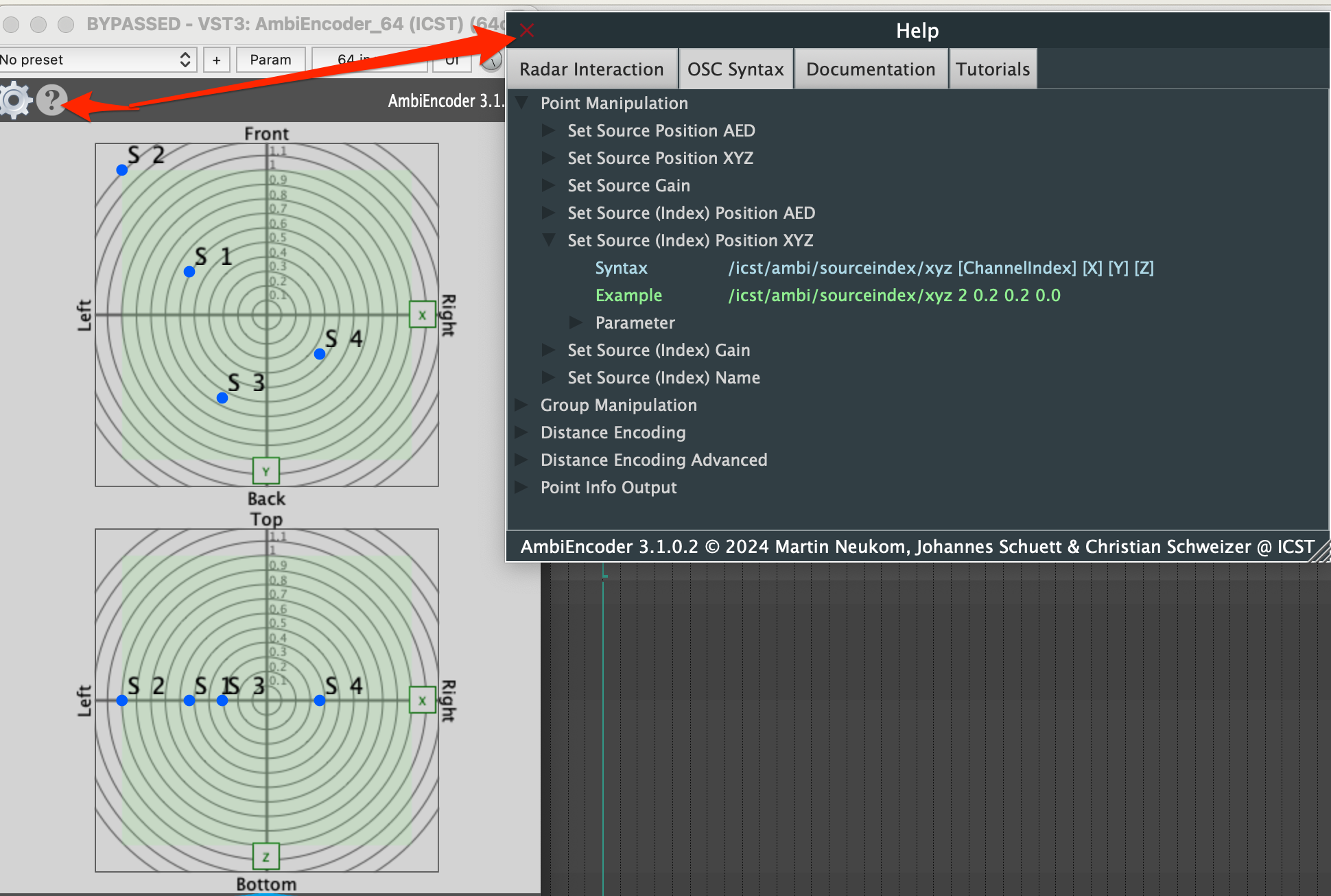
Figure: OSC specifications in the Help section.
Available sections:
- Help (?)
- OSC Syntax
- Sections
2. Incoming OSC Messages
Messages can be:
- Index-based (source index), e.g.,
1 - Name-based (source name), e.g.,
flute
Set Source Position (AED Format)
	/icst/ambi/source/aed [ChannelName] [Azimuth] [Elevation] [Distance]
	/icst/ambi/source/aed 'S1' 45 10 0.8
Set Source Position (XYZ Format)
	/icst/ambi/source/xyz [ChannelName] [X] [Y] [Z]
	/icst/ambi/source/xyz 'S2' 0.2 0.2 0.0
Note: The channel name (e.g S1, S2) will be sent as symbol.
Set Source (Index) Position (AED Format)
/icst/ambi/sourceindex/aed [ChannelIndex] [Azimuth] [Elevation] [Distance]
/icst/ambi/sourceindex/aed 1 45 10 0.8
Set Source (Index) Position (XYZ Format)
/icst/ambi/sourceindex/xyz [ChannelIndex] [X] [Y] [Z]
/icst/ambi/sourceindex/xyz 2 0.2 0.2 0.0
Note: Channel indices are sent as integers.
Sending Positions for External Usage
- Open the ‘OSC Out’ tab.

Note: The ICST AmbiPlugins standard format sends source names as symbols. Max users should define a Custom OSC Message:
/icst/ambi/sourceindex/xyz {i} {x} {y} {z}
/icst/ambi/sourceindex/aed {i} {a} {e} {d}
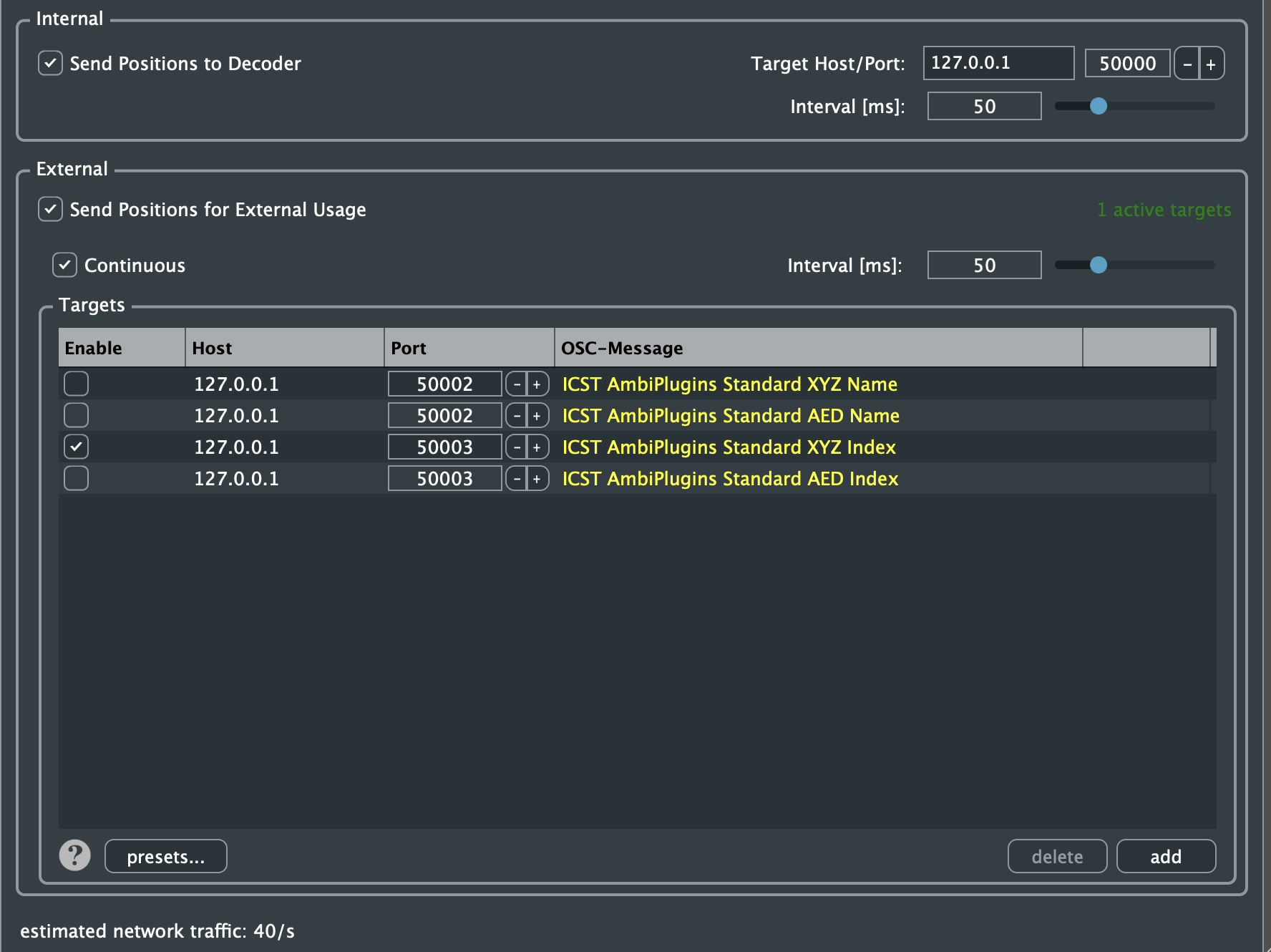
Figure: Custom ‘OSC Out’ Editor
Internal OSC Communication
To send all AmbiEncoder movements to the ICST AmbiDecoder:
- Deactivate Speaker Edit Mode in the AmbiDecoder.
- Activate the OSC port.
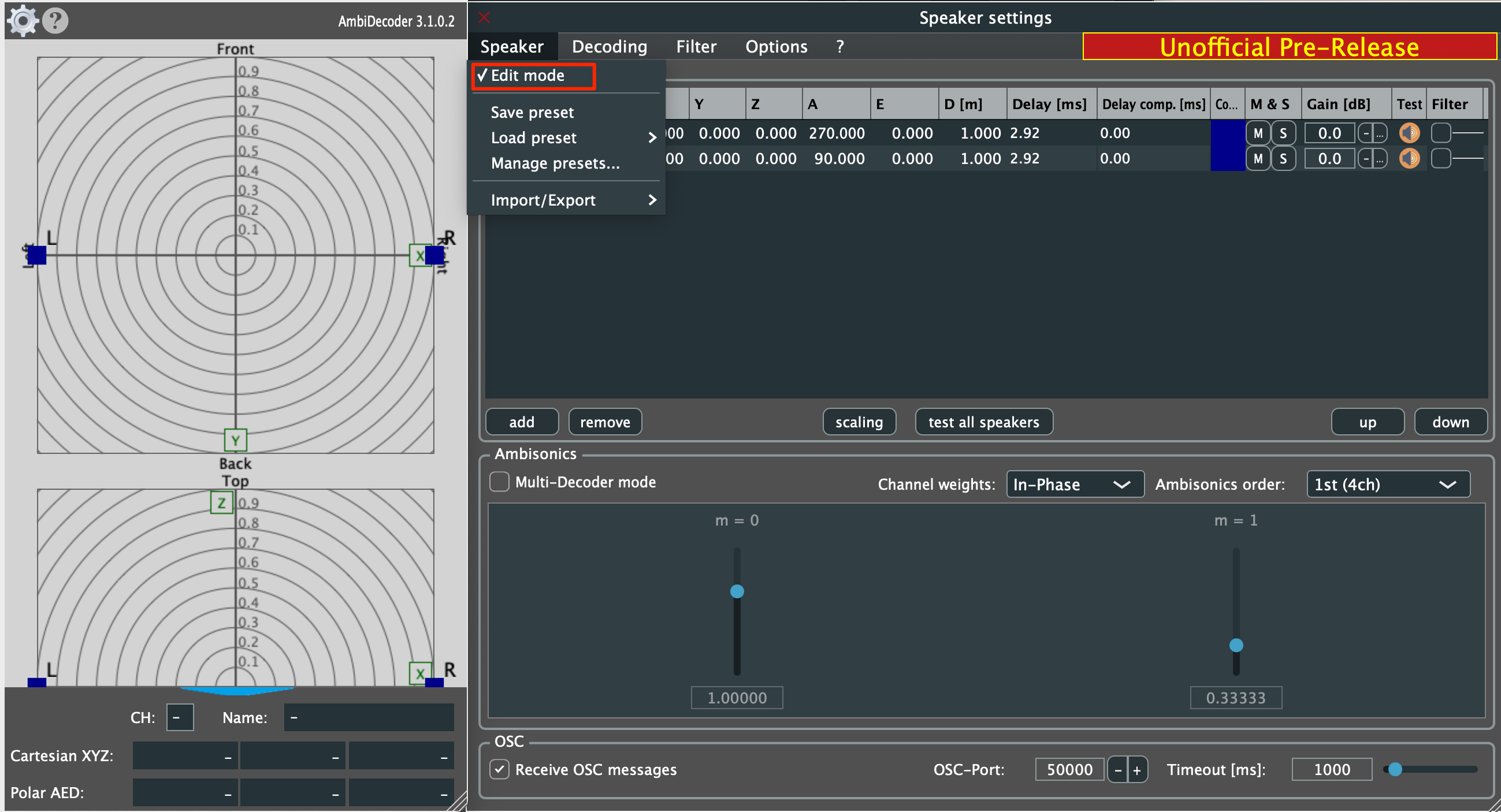

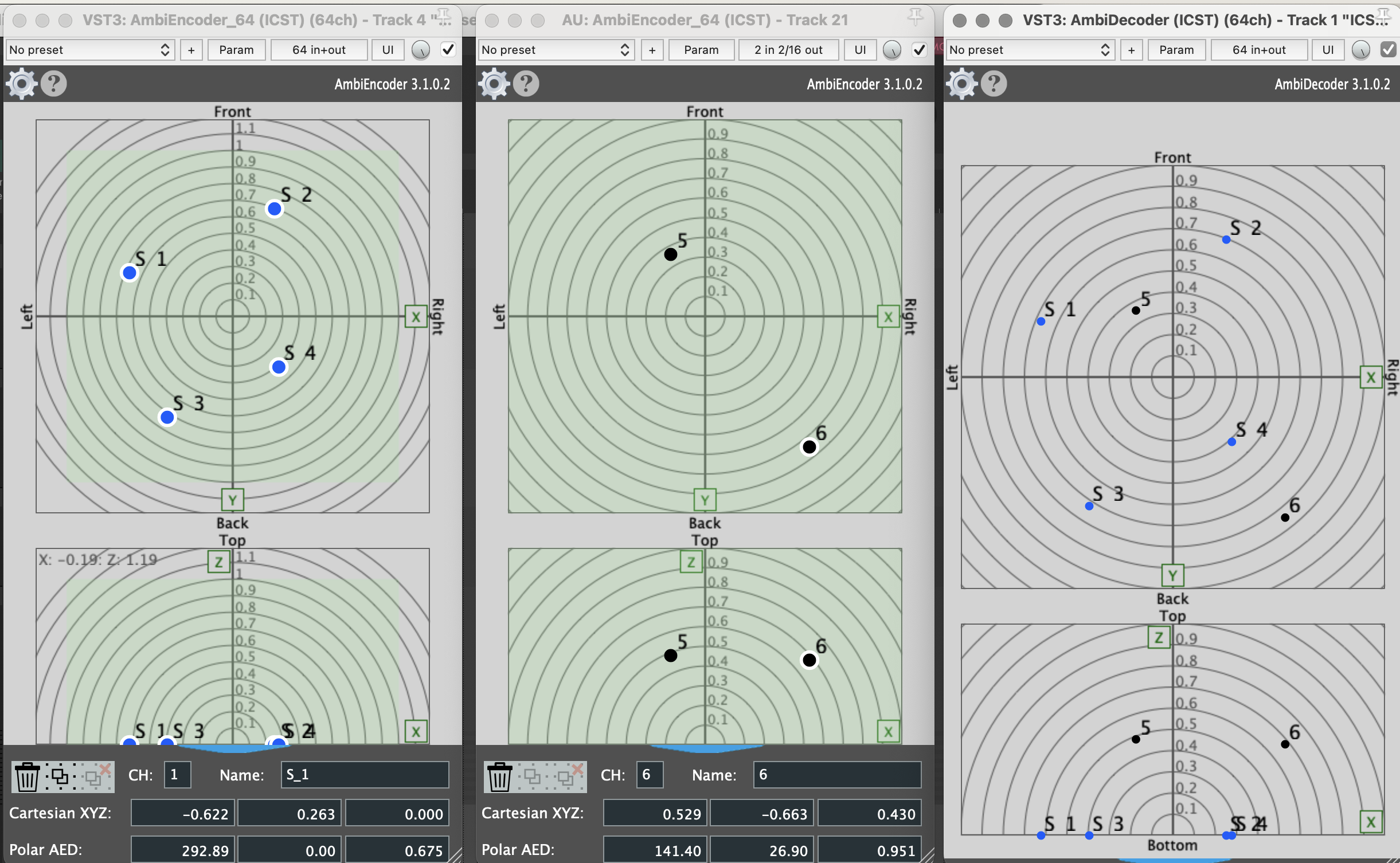
Now, the AmbiDecoder receives all OSC messages from all connected AmbiEncoders.
Vollständige OSC-Referenz (aus GitHub-Quellcode)
Abgeleitet aus dem Plugin-Quellcode (OSCHandlerEncoder.h/.cpp). Ergänzt die oben dokumentierten Standard-Nachrichten um alle weiteren unterstützten Adressen.
Quellen – Name-basiert
| OSC-Adresse | Argumente | Typ | Beschreibung |
|---|---|---|---|
/icst/ambi/source/aed | [Name] [A] [E] [D] | string, float, float, float | Position setzen (Azimut/Elevation/Distanz) per Quellname |
/icst/ambi/source/xyz | [Name] [X] [Y] [Z] | string, float, float, float | Position setzen (kartesisch) per Quellname |
/icst/ambi/source/gain | [Name] [Gain_dB] | string, float | Gain setzen per Quellname |
Quellen – Index-basiert
| OSC-Adresse | Argumente | Typ | Beschreibung |
|---|---|---|---|
/icst/ambi/sourceindex/aed | [Index] [A] [E] [D] | int, float, float, float | Position setzen (AED) per Quellindex (1-basiert) |
/icst/ambi/sourceindex/xyz | [Index] [X] [Y] [Z] | int, float, float, float | Position setzen (XYZ) per Quellindex (1-basiert) |
/icst/ambi/sourceindex/gain | [Index] [Gain_dB] | int, float | Gain setzen per Quellindex |
/icst/ambi/sourceindex/name | [Index] [Name] | int, string | Name der Quelle setzen per Index |
Gruppen
| OSC-Adresse | Argumente | Typ | Beschreibung |
|---|---|---|---|
/icst/ambi/group/aed | [Name] [A] [E] [D] [MovePoints] | string, float, float, float, int | Gruppenposition setzen (AED); MovePoints: 0=nur Gruppe, 1=mit Quellen |
/icst/ambi/group/xyz | [Name] [X] [Y] [Z] [MovePoints] | string, float, float, float, int | Gruppenposition setzen (XYZ); MovePoints: 0/1 |
/icst/ambi/group/rotate | [Name] [Rx] [Ry] [Rz] | string, float, float, float | Gruppe relativ rotieren (Euler, Grad) |
/icst/ambi/group/setrotation/euler | [Name] [Rx] [Ry] [Rz] | string, float, float, float | Absolute Gruppenrotation setzen (Euler, Grad) |
/icst/ambi/group/setrotation/quaternion | [Name] [q1] [q2] [q3] [q4] | string, float×4 | Absolute Gruppenrotation setzen (Quaternion) |
/icst/ambi/group/rotateorigin | [Name] [Rx] [Ry] [Rz] [MovePoints] | string, float, float, float, int | Gruppe um den Ursprung rotieren |
/icst/ambi/group/stretch | [Name] [Factor] | string, float | Gruppe relativ strecken/stauchen (relativ) |
/icst/ambi/group/setstretch | [Name] [Factor] | string, float | Absolute Streckung der Gruppe setzen |
Distance Encoding – Einzelparameter
| OSC-Adresse | Argumente | Typ | Beschreibung |
|---|---|---|---|
/icst/ambi/distanceencoding/mode | [Mode] | int | Modus: 0=Standard, 1=Advanced, 2=Exponential, 3=InverseProportional |
/icst/ambi/distanceencoding/unitcircle | [Radius] | float | Radius des Einheitskreises |
/icst/ambi/distanceencoding/dbunit | [dB] | float | dB-Einheit für Abstandscodierung |
/icst/ambi/distanceencoding/distanceattenuation | [Value] | float | Distanzabschwächung (nur Inverse Proportional) |
/icst/ambi/distanceencoding/centercurve | [Value] | float | Center-Kurven-Parameter |
/icst/ambi/distanceencoding/advancedfactor | [Value] | float | Advanced-Faktor |
/icst/ambi/distanceencoding/advancedexponent | [Value] | float | Advanced-Exponent |
Distance Encoding – Kombinierte Presets
| OSC-Adresse | Argumente | Typ | Beschreibung |
|---|---|---|---|
/icst/ambi/distanceencoding/standard | [UnitCircleRadius] | float | Standard-Modus + Einheitskreis setzen |
/icst/ambi/distanceencoding/advanced | [UnitCircle] [Factor] [Exponent] | float, float, float | Advanced-Modus mit 3 Parametern |
/icst/ambi/distanceencoding/exponential | [UnitCircle] [dBUnit] [CenterCurve] | float, float, float | Exponential-Modus mit 3 Parametern |
/icst/ambi/distanceencoding/inverseproportional | [UnitCircle] [dBUnit] [CenterCurve] [DistAttn] | float, float, float, float | Inverse-Proportional-Modus mit 4 Parametern |
OSC Out – Custom Message Formate
| Format | Beschreibung |
|---|---|
/icst/ambi/sourceindex/xyz {i} {x} {y} {z} | Positions-Ausgabe per Index (XYZ) |
/icst/ambi/sourceindex/aed {i} {a} {e} {d} | Positions-Ausgabe per Index (AED) |
MuseScore SSMN-Kompatibilität
| OSC-Adresse | Argumente | Beschreibung |
|---|---|---|
/aed | [CH] [A] [E] [D] [CH_check] | MuseScore SSMN-Format (int, float, float, float, int) |